The Right-Size Backup Plan
Put every size in one unit, size the backup drive for the years ahead, keep three copies, and time the upload and the restore at the speeds you really get
DotFixer's Data Storage Unit Converter shows why a drive sold as 2 TB appears in Windows as about 1,863 GB, and the Download Time Calculator turns a size and a speed into a time. Neither says what size of drive to buy, or how long a whole library takes to reach the cloud over the slower half of your connection, and that is where backups go wrong. The plan joins the two. A library Windows shows as 1,700 GB leaves 162.65 GB spare on a 2 TB drive, not the 300 GB the labels suggest, and outgrows it in month 7; sized for three years of growth, old versions and an 80% fill limit, it needs a 4 TB drive, not an 8. On an example plan of 300 Mbps down and 20 Mbps up, its first cloud backup takes 9 days 10 hours, not the 15 hours the headline speed suggests, so the plan orders the upload to put your most important folder in the cloud first. Every figure is computed by the site's own calculators and every time is rounded up; the rules of thumb (10% overhead, 20% for old versions, an 80% fill limit) are labelled as such, and the worked numbers are examples. It recommends no drive, cloud service or internet plan, and it cannot recover files already lost. Included: 7 steps, 4 printable working pages, reference tables and a quickstart, plus a personalised sheet worked out from the numbers you entered in the calculator.
Look inside
Two full pages from the plan, exactly as printed. Click either to read it at full size before you decide.
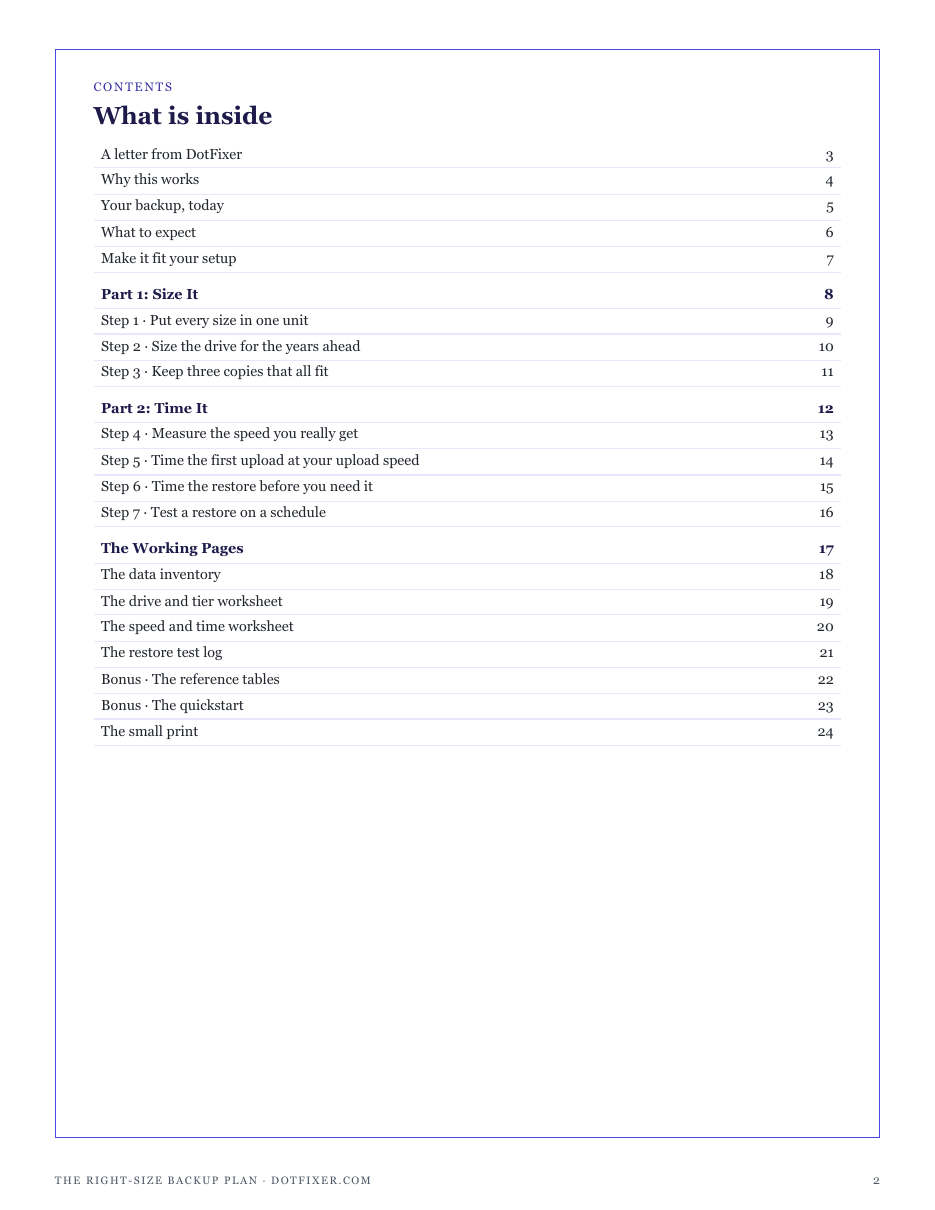
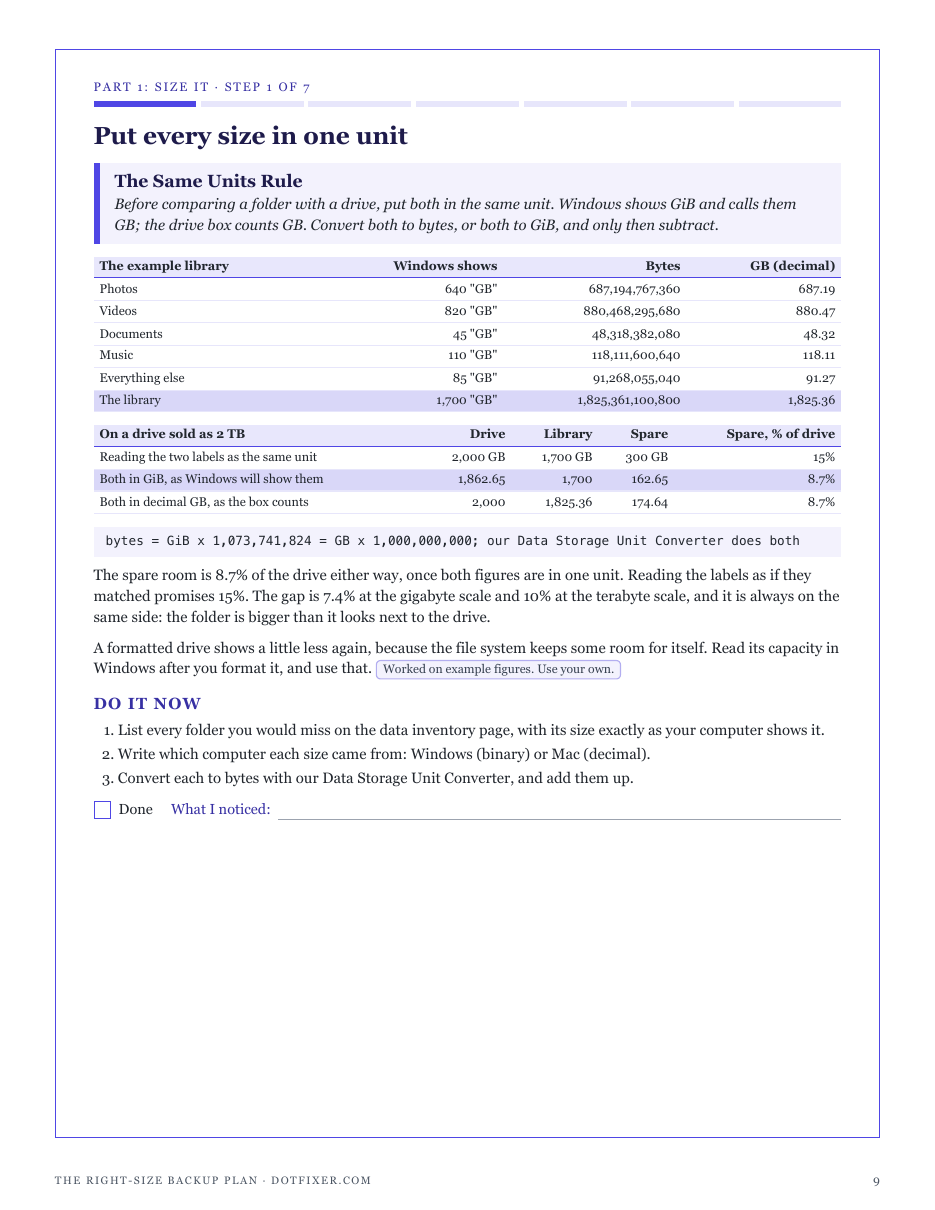
What is in it
- The Same Units Rule: every size in bytes or GiB before comparing, and why Windows' GB is not the drive box's GB
- The Headroom Rule: a drive sized for growth, old versions and a fill limit, and the smallest common size that holds it
- The 3-2-1 Rule: three copies on two kinds of storage, one away from the building, each checked to hold the library for years
- The Measured Speed Rule: your real Mbps from a timed download, and the hours a faster plan would really save
- The First Upload Rule: the first cloud backup timed at your upload speed, folder by folder, most important first
- The Restore Clock Rule: a full restore timed from the local drive and from the cloud, and the restore order
- The Restore Test Rule: a file a month and a folder a quarter restored, compared in one unit and opened
- Four printable working pages: data inventory, drive and tier worksheet, speed and time worksheet, restore test log
- Reference tables: what each drive size shows in Windows, and transfer times at common speeds
- A one-page quickstart and a personalised sheet worked out from the numbers you enter
- ✓ 24 printable pages
- ✓ 10 sections, worksheets and templates
- ✓ A second PDF worked out from the numbers you enter
- ✓ No account needed, just an email address
- ✓ Instant download; link valid 7 days
Price includes any taxes. Sold by GrabURL, who handle checkout and support. The charge appears on your statement as GrabURL.
The plan picks up where the free Data Storage Unit Converter and Download Time Calculator leave off. The converter shows why a drive sold as 2 TB appears in Windows as about 1,863 GB; the calculator turns a size and a speed into a time. The plan puts every size in one unit, sizes a backup drive for the years ahead rather than for today, keeps three copies (the 3-2-1 rule), and times the first upload at your upload speed and the restore before you need it, with a restore test log to prove it works. It recommends no drive, brand, cloud service or internet plan, and it cannot recover files already lost. The worked figures are examples; your library is yours to fill in.